Salesforce Commerce Cloud shipping solution
Integrate Wuunder into your Salesforce B2C Commerce Cloud environment via our LINK cartridge. The integration offers a full checkout widget with dynamic delivery options, a Delivery Matrix for smart rate configuration, and seamless connection to label creation, tracking and returns. Support for both SFRA and SiteGenesis.
Wuunder is purpose-built for enterprise merchants on SFCC who need more than just a rate calculator. Combine checkout conversion (GreenChoice), multi-carrier selection from 300+ carriers, and post-purchase communication in one platform, without separate middleware or standalone tracking tools.

Why Salesforce merchants choose Wuunder
| Feature | Wuunder |
|---|---|
| Carriers | 300+ |
| Parcelshop locator | ✔️ Parcelshop, Locker |
| Delivery Matrix | ✔️ |
| Warehouse optimalisation | ✔️ Best-Day-Delivery |
| Sustainable carrier selection | ✔️ GreenChoice (wetenschappelijk bewezen) |
| Multi-storefront support | ✔️ |
| Multi-colli support | ✔️ |
| letters and documents | ✔️ |
| (Letterbox) parcels | ✔️ |
| Pallets & Groupage | ✔️ B2B & B2C |
| Resell rates (no own contract needed) | ✔️ (PostNL, DHL, DPD) |
| Personal support | ✔️ (dedicated account manager) |
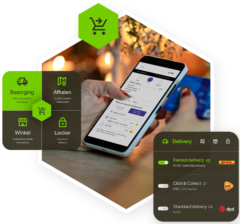
How does Salesforce shipping work with Wuunder?
Step 1: Install the Wuunder SFCC cartridge
Add the Wuunder cartridge to your SFCC environment (SFRA or SiteGenesis). Configure your API keys and Webshop ID in Business Manager. The cartridge places the checkout widget automatically in your shipping step.
Step 2: Set up your Delivery Matrix
Configure your Delivery Matrix in MyWuunder: which delivery options and rates to show per product category, weight, dimensions, value and destination. The matrix determines which carriers and services are passed to your SFCC checkout. Think home delivery, pickup points, lockers, Nominated Day or GreenChoice (Best Day Delivery).
Step 3: GreenChoice selects the smartest delivery moment
When GreenChoice is active, the algorithm calculates which day the carrier is already routing through the recipient's area. That day is shown as the green recommendation. Result: higher conversion, fewer warehouse peaks and lower last-mile costs.
Step 4: The checkout widget presents everything to your customer
The Wuunder checkout widget renders in the shipping step of your SFCC storefront. On every address change, the widget retrieves current options via a token-based API call and displays:
- Carriers and services matching the Delivery Matrix
- Pickup points and lockers on an interactive map
- GreenChoice as a visually highlighted sustainable option
- Nominated Day: customer picks a specific delivery day
- Rates calculated on weight, volume and destination
You can style the widget to your own branding and configure which tabs are shown: Delivery, Store, Pickup and Parcel locker.
Step 5: Customer places order, order is committed
After checkout, the cartridge automatically commits the order to Wuunder via a background job (every 1-2 minutes). Wuunder receives the selected carrier, service and delivery day.
Step 6: Pick & pack in your warehouse
The order flows to your WMS with the selected carrier and expected pickup day. Your team picks, packs in the correct packaging and prints the label via Wuunder Ship. Customs documents are generated automatically. Multi-colli orders supported.
Step 7: Pickup by the carrier
The carrier is informed automatically. Pickup on the next business day or at your fixed daily collection time.
Step 8: Branded tracking to your customer
Wuunder Track sends proactive notifications in your storefront language. Delays or exceptions trigger automatic updates so your service team isn't burdened with "where is my order?" queries.
Step 9: Returns via the return portal
Your customer starts a return via Wuunder Returns: a branded portal connected to your SFCC environment. QR code or label, drop-off at a service point, and the option to exchange. Return status visible in your Order Management.
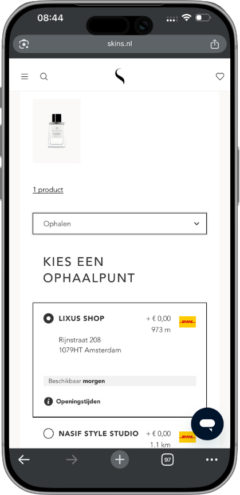
The Wuunder Checkout in Salesforce
The checkout widget (previously known as Paazl checkout) is a JavaScript component loaded into your SFCC storefront via the LINK cartridge. It communicates through a token-based API mechanism: when the shipping step loads, the cartridge generates a session token, after which the widget retrieves available options based on the delivery address and your Delivery Matrix.
What your customer experiences:
- Selection of home delivery, stores (Click & Collect), pickup points and parcel lockers including opening hours
- Your own retail stores are shown as pickup locations. Read more about omnichannel shipping
- Per tab the relevant options with rates, expected delivery date and carrier name
- Map view for PICKUP and STORE tabs showing locations, opening hours and distance
- GreenChoice as a prominent green day selection
- Fully customisable styling (colours, fonts, borders) via Business Manager configuration

Choice of many different national and international carriers
Carrier portfolio


Delivery Matrix: smart rate logic
The Delivery Matrix is the heart of your shipping configuration. You define per product category, weight, dimensions and order value which shipping options and rates apply. Wuunder walks through the columns until it finds a match with the product in the cart, then sends the corresponding options to the checkout.
This means: no generic "€4.95 standard shipping" for everyone, but context-sensitive options. A lightweight item gets letterbox mail and pickup point. A heavy product gets pallet delivery. An international order gets the right cross-border carrier with automatic customs handling.
Technical integration
- Supports SFRA (int_paazl_sfra) and SiteGenesis (int_paazl_controllers)
- Configuration via Site Preferences in Business Manager
- Web service endpoints for staging and production
- Background job "Commit Order" syncs orders every 1-2 minutes to Wuunder
- Fallback shipping option configurable per country (in case API connection fails)
These brands deliver a perfect delivery experience with Wuunder


Ready to supercharge your SFCC checkout with smarter delivery options?
In 15 minutes, we show you how the Wuunder cartridge works within your Salesforce Commerce Cloud environment, including Delivery Matrix, GreenChoice and branded tracking.
Q: Which SFCC architectures are supported?
A: Both SFRA (Storefront Reference Architecture) and SiteGenesis. The cartridge is available as a LINK integration.
Q: How do I install Wuunder in Salesforce Commerce Cloud?
A: Add the cartridge to your cartridge path in Business Manager, configure your API keys and Site Preferences, activate the shipping method and set up the Commit Order job. → Full installation instructions
Q: What is the Delivery Matrix?
A: A configuration tool that lets you define per product category, weight, dimensions and value which shipping options and rates are shown. Every product in the checkout gets exactly the right delivery choices.
Q: Can I style the checkout widget?
A: Yes. Choose from predefined styles or set your own fonts, colours and borders via Business Manager. The widget adapts visually to your brand.
Q: What happens if the API connection fails?
A: The cartridge has a fallback configuration per country. You set a default shipping option (carrier, service, rate) that is shown when the live connection is temporarily unavailable.
Q: Do I need my own carrier contract?
A: No. Configure Resell rates in your Delivery Matrix (PostNL, DHL, DPD) via one of our Resell partners and go live without a carrier agreement. Have your own contract? Use your own rates or the preconfigured Wuunder rates.
Q: Does Wuunder offer labeling and tracking for SFCC?
A: Yes. After checkout, Wuunder Ship handles label creation and Wuunder Track delivers branded customer communication.
Q: Can I show Click & Collect and parcel lockers?
A: Yes. The widget supports four tabs: DELIVERY (home delivery), STORE (Click & Collect), PICKUP (service points) and PARCEL_LOCKER. You configure which tabs are active per site.
Isn't this your eCommerce platform? Other available integrations are:
Shopware
Magento
Shopify Plus
WooCommerce
Or connect via our REST API.