Shopware shipping solution
Shopware is a modern and flexible commerce platform for merchants who want to build a future-proof webshop with room for growth, personalisation and international expansion. The platform is suitable for both B2C and B2B organisations and is often chosen by businesses seeking more freedom in the setup of their commerce environment.
The strength of Shopware lies in its combination of flexibility, API-first thinking and a strong focus on customer experience. This makes the platform interesting for merchants who want to optimise not only their storefront, but also their checkout and post-purchase flow. With Wuunder you add a smart shipping layer, including label creation, carrier selection, tracking and returns.
For webshops that want to better connect commerce and operations, Shopware is a strong foundation. In combination with Wuunder, a scalable solution emerges that helps automate shipping processes, improve the customer journey and work more efficiently within a growing e-commerce operation.

Why Shopware merchants choose Wuunder
| Feature | Wuunder |
|---|---|
| Carrier services | 300+ |
| Parcelshop & -locker locator (PUDO) | ✔️ Click and Collect |
| Physical stores (retail chain) | ✔️ |
| Warehouse optimalisation | ✔️ Best-Day-Delivery |
| Sustainable carrier selection | ✔️ GreenChoice (wetenschappelijk bewezen) |
| Multi-storefront support | ✔️ |
| Multi-colli support | ✔️ |
| letters and documents | ✔️ |
| (Letterbox) parcels | ✔️ |
| Pallets & Groupage | ✔️ B2B & B2C |
| Resell rates (no own contract needed) | ✔️ (PostNL, DHL, DPD) |
| Personal support | ✔️ (dedicated account manager) |
How does Shopware shipping work with Wuunder?
Step 1: Connect your Shopware 6 webshop
Install the Wuunder checkout plugin in your Shopware admin. Connect to your Wuunder account and decide which carriers, services and rates to offer per Sales Channel. This is stored in the Delivery Matrix.
Step 2: Configure your checkout
Set your shipping strategy per Sales Channel and destination: which carriers to show, own contract rates or Resell pricing, and which delivery methods to activate. Think home delivery, service points, lockers, Nominated Day or Best Day Delivery (GreenChoice).
Step 3: Wuunder calculates available delivery options
Based on the delivery address and your shipping rules, Wuunder determines which carriers and services are available. Rates and delivery times are retrieved in real-time from your Delivery Matrix.
Step 4: GreenChoice optimises the delivery moment
When activated, GreenChoice presents your customer with the delivery day the carrier is already in the neighbourhood. Fewer warehouse peaks on Monday, lower fulfilment costs and a stronger sustainability story for your brand.
Step 5: The Shopware checkout plugin shows the result of steps 2-4 to your customer
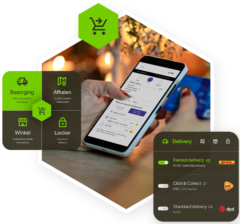
The Wuunder Checkout widget loads in the checkout step of your Shopware 6 storefront. As soon as your customer enters a delivery address, the plugin makes a real-time API call and presents: available carriers and services for that destination (step 2), GreenChoice as the pre-selected sustainable delivery day (step 4), an interactive map with pickup points and lockers, rates and Nominated Day for choosing a specific delivery day. This works with both the standard Shopware Storefront and headless setups via the Store API. Language and currency switch automatically per Sales Channel. → View screenshots and all checkout capabilities
Step 6: Customer places the order
Step 7: Pick & pack in your warehouse
The order arrives in your WMS or Shopware backend with the selected carrier, service and expected pickup day. Your warehouse staff picks the items and packs in the correct box. Print the label via One Click Printing or in bulk, seal the parcel, done. Customs documents for non-EU are included automatically, unless the carrier supports paperless customs.
Step 8: Pickup by the carrier
The carrier is automatically informed when the label is created. Pickup takes place on the next business day, or at your fixed daily collection times.
Step 9: Branded tracking to your customer
We keep the recipient informed via Wuunder Track: picked up, in transit, delivery attempt, delivered. Something goes wrong? The recipient gets an automatic heads-up before they start searching.
Step 10: Returns via the return portal
Your customer initiates a return via Wuunder Returns: a branded portal linked to your Shopware domain. Choose QR code or print label, drop off at any nearby service point, and exchange instead of refund. Return status syncs back to Shopware in real-time.
Choice of many different national and international carriers
Carrier portfolio


The Wuunder Checkout in Shopware 6
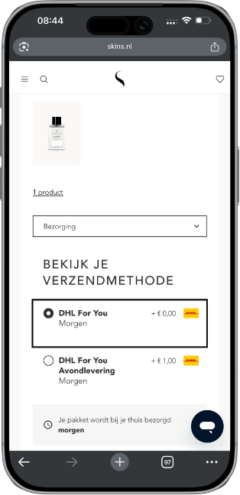
The Wuunder Checkout (formerly known as Paazl Checkout) is a plugin within Shopware's checkout flow (shipping method). Once a shopper enters their delivery address, the widget fires an API call, retrieves available delivery options and renders them into the storefront.
What does your customer see?
- Carriers and services matching the entered address, with live rates and expected delivery times
- A map view showing nearby pickup points and lockers including opening hours (Parcelshop Locator)
- Your own retail stores as pickup locations. Read more about omnichannel shipping.
- The GreenChoice option: visually marked as the greenest choice, based on when the carrier is already routing through the area
- Nominated Day: pick a specific delivery day and time slot
- Language, currency and available carriers switch per Sales Channel without any code changes

How the widget works technically in Shopware
The plugin hooks into Shopware's shipping method lifecycle. Every time the address block changes (different country, different postcode), the widget fires a fresh request. The response dictates what appears in the checkout. Carrier config, rules and rates live in MyWuunder; the plugin picks them up automatically.
You configure in MyWuunder which carriers, services and pricing rules are shown per Sales Channel. A Dutch customer sees PostNL and DHL, a Belgian customer sees Bpost and DPD, a French customer sees Colissimo. No code changes needed per market.
Technical integration
- Shopware 6 plugin available via the Shopware Store
- Compatible with Shopware 6.7.X
- REST API for custom builds: checkout, ship, track and returns fully accessible via API
- Webhooks for real-time status updates to your ERP/WMS
- Multi-warehouse support: different shipping rules per fulfilment location


Ready to professionalise your Shopware shipping process? Start with a free scan.
In 15 minutes, we demo the Shopware plugin live: how it behaves per Sales Channel, what GreenChoice does for your delivery spread, and how it connects to your WMS.
Q: How do I install Wuunder in Shopware 6?
A: Install the Wuunder checkout plugin via the Shopware Store. Activate the plugin in your admin panel and connect to your Wuunder account. You're live within minutes. → Technical guide
Q: Which Shopware versions are supported?
A: Shopware 6.7 and lower.
Q: Can I connect multiple Sales Channels?
A: Yes. Wuunder supports Shopware's Sales Channel architecture. Configure different carriers, languages, currencies and shipping rules per channel.
Q: Do I need my own carrier contract?
A: No. Activate Resell pricing per Sales Channel (PostNL, DHL, DPD) and ship today via one of our Resell partners. Own contract? Upload it once and your rates appear automatically across all channels.
Q: Can I use pallet carriers from Shopware?
A: Yes. Wuunder connects Shopware to pallet carriers like DSV, TransMission and Ben Becker.
Q: How does the checkout widget work in Shopware?
A: The Wuunder checkout plugin integrates into the Shopware checkout and shows dynamic delivery options with rates. GreenChoice automatically selects the smartest delivery moment.
Q: Does Wuunder support international shipping from Shopware?
A: Yes. Customs documents (CN23, commercial invoices) are generated automatically. Ship via Spring GDS, DHL Express, UPS or FedEx to 200+ countries.
Q: How do returns work?
A: Via Wuunder Returns portal on your Shopware domain, customers request a return with one click. QR code, label print, or pickup at home. Exchange is offered before refund. Status flows back into your Shopware admin.
Do you have another eCommerce platform? Check some other integrations
Magento
Salesforce Commerce Cloud
Shopify Plus
WooCommerce.
Or connect via our REST API.